Table of Contents
Project Source Code: All files (backend, frontend, docker-compose, configuration) are available on GitLab: poc_rag - BLOG_V1
1. Introduction
Retrieval-Augmented Generation (RAG) has become essential for querying specialized document corpora with AI. Rather than re-training a language model (expensive and time-consuming), RAG combines vector search and text generation to obtain relevant answers based on your own documents.
In this article, I share the complete construction of a production RAG system, demonstrated with 193 PDFs (5,961 pages) of varied documentation. This architecture is applicable to any specialized domain: legal, medical, technical, commercial, HR, finance, etc. The architecture is based on:
- FastAPI for the REST API
- HuggingFace embeddings (all-MiniLM-L6-v2) for vectorization
- Chroma for the vector database
- Ollama (llama3.1:8b) for response generation
- Docker Compose for orchestration
This POC illustrates the real challenges of a RAG architecture: Docker network isolation, embedding context limits, CPU performance optimization, and persistent volume management.
2. Key Concepts
What is RAG?
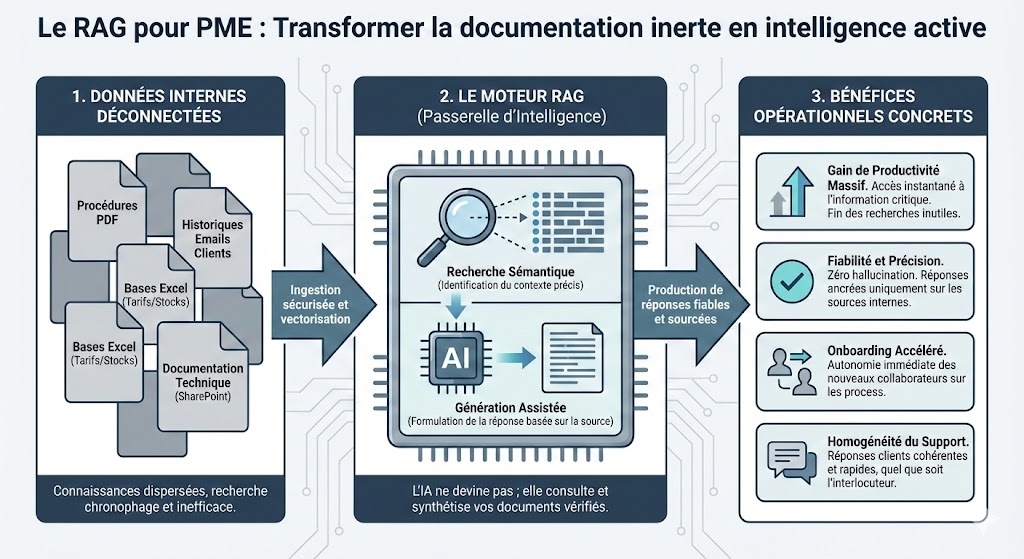
Retrieval-Augmented Generation combines two steps:
- Retrieval: search for relevant documents in a vector database via semantic similarity
- Generation: an LLM uses these documents as context to generate a precise answer
Why RAG for Specialized Domains?
Specialized corpora constantly evolve: legislation, technical standards, internal documentation, medical research, etc. A classic language model (even GPT-4) doesn't know these specific documents, isn't up to date, or can't access your confidential documents.
RAG allows you to:
- Index your own documents (private and confidential)
- Guarantee traceability of responses with cited sources
- Update the corpus without expensive re-training
- Operate 100% locally with open-source LLMs (Ollama)
- Adapt the vectorization strategy to your domain
Embeddings: Transforming Text into Vectors
Embeddings are vector representations of text. Two similar texts will have close vectors in vector space, enabling fast semantic similarity search.
Example of vectorized embeddings:
"What is the LLC creation procedure?"→ 384-dimension vector [0.23, -0.45, 0.12, ...]"LLC: 2 members minimum, 1€ capital"→ Vector close to the previous one"How to configure Docker?"→ Very different vector (different domain)
In this project, I use all-MiniLM-L6-v2 (HuggingFace):
- 384 dimensions (lightweight and fast)
- Multilingual support (French included)
- Works on CPU (no GPU needed for embedding)
- ~1 token ≈ 4 characters (512 tokens max ≈ 2,048 characters)
3. Technical Implementation
System Architecture
┌─────────────────────────────────────────────┐
│          POC RAG - Architecture             │
├─────────────────────────────────────────────┤
│                                             │
│  Frontend (nginx:80)                        │
│  ┌───────────────────────────────┐          │
│  │ HTML/CSS/JS chat interface    │          │
│  └───────────────────────────────┘          │
│                ↓                            │
│  Backend (FastAPI:8000)                     │
│  ┌───────────────────────────────┐          │
│  │ • /api/query (POST)           │          │
│  │ • /health (GET)               │          │
│  │ • /api/refresh (POST)         │          │
│  └───────────────────────────────┘          │
│                ↓                            │
│  RAG System (rag_system.py)                 │
│  ┌───────────────────────────────┐          │
│  │ PyPDFLoader → PDFs            │          │
│  │ CharacterTextSplitter → Chunks│          │
│  │ HuggingFaceEmbeddings         │          │
│  │ Chroma Vector DB              │          │
│  │ RetrievalQA Chain             │          │
│  └───────────────────────────────┘          │
│                ↓                            │
│  Persistent volumes                         │
│  • data/docs/ (193 PDFs)                    │
│  • data/chroma_db/ (vector database)        │
│  • data/huggingface_cache/ (model)          │
│                                             │
└─────────────────────────────────────────────┘
                 ↓
    ┌──────────────────────────┐
    │ Ollama LLM (remote)      │
    │ localhost:11434          │
    │ • llama3.1:8b            │
    └──────────────────────────┘
Docker Compose Configuration
The system is orchestrated via Docker Compose with persistent volumes for data.
version: '3.8'

services:
  backend:
    build: ./backend
    container_name: rag_backend
    ports:
      - "8000:8000"
    environment:
      - OLLAMA_HOST=http://localhost:11434
      - OLLAMA_MODEL=llama3.1:8b
      - DOCS_FOLDER=/app/data/docs
      - DB_FOLDER=/app/data/chroma_db
      - HF_HOME=/root/.cache/huggingface
    volumes:
      - ./data/docs:/app/data/docs
      - ./data/chroma_db:/app/data/chroma_db
      - ./data/huggingface_cache:/root/.cache/huggingface
    command: python -u -m uvicorn main:app --host 0.0.0.0 --port 8000 --log-level debug
    networks:
      - rag_network

  frontend:
    build: ./frontend
    container_name: rag_frontend
    ports:
      - "8080:80"
    depends_on:
      - backend
    networks:
      - rag_network

networks:
  rag_network:
    driver: bridge
RAG System (rag_system.py)
The core system manages PDF loading, chunking, embeddings and queries.
from langchain.document_loaders import PyPDFLoader
from langchain.text_splitter import CharacterTextSplitter
from langchain.vectorstores import Chroma
from langchain.embeddings import HuggingFaceEmbeddings
from langchain.llms import Ollama
from langchain.chains import RetrievalQA
from langchain.prompts import PromptTemplate

class MyRag:
    def __init__(self, docs_folder, db_folder, ollama_host, ollama_model,
                 chunk_size=800, chunk_overlap=150,
                 hf_model_name="all-MiniLM-L6-v2",
                 hf_home="/root/.cache/huggingface",
                 hf_device="cpu",
                 llm_temperature=0.7, llm_num_predict=512,
                 top_k_results=3):
        self.docs_folder = docs_folder
        self.db_folder = db_folder
        self.ollama_host = ollama_host
        self.ollama_model = ollama_model
        self.chunk_size = chunk_size
        self.chunk_overlap = chunk_overlap
        self.hf_model_name = hf_model_name
        self.hf_home = hf_home
        self.hf_device = hf_device
        self.llm_temperature = llm_temperature
        self.llm_num_predict = llm_num_predict
        self.top_k_results = top_k_results
        self.db = None
        self.qa_chain = None
        self.ollama_available = False
        self.doc_count = 0

    def initialize(self):
        """Initialize the RAG"""
        # Load or create vector database
        if self._db_exists_and_has_data():
            self._load_vector_db()
        else:
            documents = self._load_documents()
            self._create_vector_db(documents)

        # Configure Ollama
        self._setup_ollama()

    def _load_documents(self):
        """Load PDFs"""
        documents = []
        pdf_files = list(Path(self.docs_folder).glob("*.pdf"))

        for pdf_file in pdf_files:
            loader = PyPDFLoader(str(pdf_file))
            docs = loader.load()
            documents.extend(docs)

        return documents

    def _create_vector_db(self, documents):
        """Create vector database"""
        # Split into chunks
        text_splitter = CharacterTextSplitter(
            chunk_size=800,
            chunk_overlap=150,
            separator="\n"
        )
        chunks = text_splitter.split_documents(documents)

        # HuggingFace embeddings
        embeddings = HuggingFaceEmbeddings(
            model_name="all-MiniLM-L6-v2",
            cache_folder="/app/data/huggingface_cache",
            model_kwargs={"device": "cpu"}
        )

        # Create Chroma DB
        self.db = Chroma.from_documents(
            chunks,
            embeddings,
            persist_directory=self.db_folder
        )
        self.db.persist()

    def _setup_ollama(self):
        """Configure Ollama LLM"""
        llm = Ollama(
            base_url=self.ollama_host,
            model=self.ollama_model,
            temperature=0.7,
            num_predict=512
        )

        # Generic prompt (adaptable to any domain)
        prompt_template = f"""You are an expert assistant in {self.domain}.
Use the provided documents to answer precisely and in a structured manner.

Document context:
{{context}}

Question: {{question}}

Answer clearly and in a well-structured manner. Always cite your sources.
If the information is not in the documents, state it explicitly."""

        PROMPT = PromptTemplate(
            template=prompt_template,
            input_variables=["context", "question"]
        )

        # RAG chain
        self.qa_chain = RetrievalQA.from_chain_type(
            llm=llm,
            chain_type="stuff",
            retriever=self.db.as_retriever(search_kwargs={"k": 3}),
            return_source_documents=True,
            chain_type_kwargs={"prompt": PROMPT}
        )

    def query(self, question, k=3):
        """Query the system"""
        # Similarity search
        results = self.db.similarity_search(question, k=k)

        # Generate with LLM
        result = self.qa_chain({"query": question})

        return {
            "answer": result["result"],
            "sources": [
                {
                    "file": Path(doc.metadata["source"]).name,
                    "content": doc.page_content[:300]
                }
                for doc in results
            ]
        }
FastAPI API (main.py)
from fastapi import FastAPI, HTTPException, BackgroundTasks
from fastapi.middleware.cors import CORSMiddleware
from pydantic import BaseModel
from rag_system import MyRag
from config import config
import os

app = FastAPI(
    title="RAG System - Retrieval-Augmented Generation",
    description="RAG API for querying specialized documents",
    version="1.0.0"
)

# CORS configuration
app.add_middleware(
    CORSMiddleware,
    allow_origins=["*"],  # Restrict in production
    allow_methods=["*"],
    allow_headers=["*"]
)

# Global RAG instance
rag_system = None

@app.on_event("startup")
async def startup_event():
    """Initialization on startup"""
    global rag_system
    print("[INFO] Starting RAG system initialization...")
    try:
        rag_system = MyRag(
            docs_folder=config.DOCS_FOLDER,
            db_folder=config.DB_FOLDER,
            ollama_host=config.OLLAMA_HOST,
            ollama_model=config.OLLAMA_MODEL,
            chunk_size=config.CHUNK_SIZE,
            chunk_overlap=config.CHUNK_OVERLAP,
            hf_model_name=config.HF_MODEL_NAME,
            hf_home=config.HF_HOME,
            hf_device=config.HF_DEVICE,
            llm_temperature=config.LLM_TEMPERATURE,
            llm_num_predict=config.LLM_NUM_PREDICT,
            top_k_results=config.TOP_K_RESULTS
        )
        rag_system.initialize()
        print("[OK] RAG system initialized successfully")
    except Exception as e:
        print(f"[ERROR] Failed to initialize RAG system: {e}")
        raise

class QueryRequest(BaseModel):
    question: str
    k: int = 3

@app.post("/api/query")
async def query(request: QueryRequest):
    """Query the documents"""
    global rag_system
    if rag_system is None or rag_system.db is None:
        raise HTTPException(status_code=503, detail="RAG not initialized")

    try:
        result = rag_system.query(request.question, k=request.k)
        return {
            "question": request.question,
            "answer": result["answer"],
            "sources": result["sources"],
            "model": config.OLLAMA_MODEL
        }
    except Exception as e:
        raise HTTPException(status_code=500, detail=str(e))

@app.get("/health")
async def health_check():
    """Check system status"""
    global rag_system
    if rag_system is None:
        return {
            "status": "initializing",
            "rag_initialized": False,
            "docs_count": 0,
            "ollama_connected": False
        }

    return {
        "status": "healthy",
        "rag_initialized": rag_system.db is not None,
        "docs_count": rag_system.doc_count,
        "ollama_connected": rag_system.ollama_available
    }

@app.post("/api/refresh")
async def refresh_documents(background_tasks: BackgroundTasks):
    """Refresh the vector database"""
    global rag_system
    if rag_system is None:
        raise HTTPException(status_code=503, detail="RAG unavailable")

    background_tasks.add_task(rag_system.refresh)
    return {"message": "Refresh in progress..."}
4. Best Practices
Optimal Chunking
Document splitting is crucial for result quality.
text_splitter = CharacterTextSplitter(
    chunk_size=800,      # Chunk size
    chunk_overlap=150,   # Overlap between chunks (avoids context loss)
    separator="\n"       # Split on line breaks
)
Why 800 characters?
- Compatible with
all-MiniLM-L6-v2(~512 token limit) - Large enough to preserve semantic context
- Small enough for precise results
The 150-character overlap prevents splitting a concept in two (e.g., a legal article).
Data Persistence
Docker volumes guarantee data persistence between restarts:
volumes:
  - ./data/docs:/app/data/docs                          # Source PDFs
  - ./data/chroma_db:/app/data/chroma_db                # Vector database
  - ./data/huggingface_cache:/root/.cache/huggingface  # Embeddings model
After the first initialization (15-20 minutes), restarts are instantaneous because the vector database is already built.
Error Handling and Fallbacks
if self.qa_chain and self.ollama_available:
    try:
        result = self.qa_chain({"query": question})
        answer = result.get("result", "")
    except Exception as e:
        answer = f"Generation error: {e}"
else:
    # Fallback: return relevant chunks
    answer = "Relevant excerpts:\n\n"
    answer += "\n\n---\n\n".join([doc.page_content[:500] for doc in results])
If Ollama is inaccessible, the system still returns the relevant chunks found by vector search.
5. Security
Network Isolation and Private Data
Principle: Your documents remain on your infrastructure. No data is sent to OpenAI or cloud services.
The system works 100% locally:
- Embeddings:
all-MiniLM-L6-v2downloaded once, then cached - Vector database: Local Chroma DB
- LLM: Ollama on your local network (or same machine)
CORS and API Security
Warning: The current configuration allows allow_origins=["*"] for development. In production, limit to authorized origins.
app.add_middleware(
    CORSMiddleware,
    allow_origins=[
        "https://your-domain.com",
        "https://app.your-domain.com"
    ],
    allow_credentials=True,
    allow_methods=["GET", "POST"],
    allow_headers=["*"]
)
Sensitive Environment Variables
Never hardcode configurations in code:
OLLAMA_HOST=http://localhost:11434
OLLAMA_MODEL=llama3.1:8b
DOCS_FOLDER=/app/data/docs
DB_FOLDER=/app/data/chroma_db
HF_HOME=/root/.cache/huggingface
HF_MODEL_NAME=all-MiniLM-L6-v2
HF_DEVICE=cpu
Rate Limiting and Input Validation
For a production API, add rate limiting:
from slowapi import Limiter, _rate_limit_exceeded_handler
from slowapi.util import get_remote_address

limiter = Limiter(key_func=get_remote_address)
app.state.limiter = limiter

@app.post("/api/query")
@limiter.limit("10/minute")  # Max 10 requests/minute
async def query(request: Request, query_request: QueryRequest):
    # ...
6. Real-World Use Case
Here's the interface in action with a real corpus of legal documents:
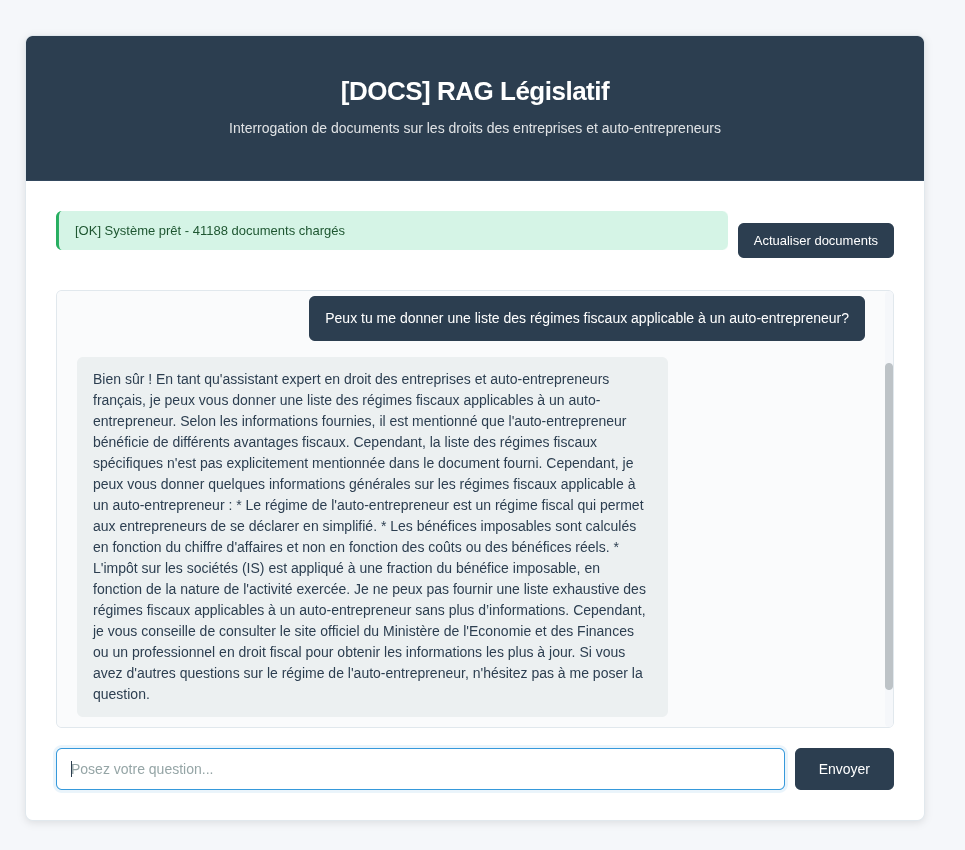
Tested Queries - Various Examples
Here are examples of real queries in different domains:
Question: "What are the tax obligations of a self-employed person?"

Response:
According to the documentation, tax obligations include:

1. Monthly or quarterly revenue declaration
2. Liberatory payment of income tax (optional)
3. CFE (Business Property Tax) from the 2nd year
4. VAT not applicable under certain thresholds (basic exemption)
5. Keeping a revenue book

Sources: auto-entrepreneur-guide.pdf (pages 12-15)Question: "What are the treatment protocols for a bacterial infection?"
Response:
According to standard medical protocols:
1. Clinical diagnosis and confirmation by culture
2. Selection of appropriate antibiotic (based on antibiogram)
3. Optimal dosage according to infection site
4. Treatment duration: generally 7-14 days
5. Follow-up and bacterial sensitivity testing
Sources: medical-protocols-2025.pdf (pages 34-41)Question: "How to configure a high-availability Kubernetes cluster?"
Response:
Main steps to configure an HA cluster:
1. Deploy at least 3 master nodes (etcd + API server)
2. Configure load balancer in front of master nodes
3. Set up etcd persistence with backup
4. Implement health checks and auto-recovery
5. Monitor with Prometheus + Grafana
Sources: kubernetes-production-guide.pdf (pages 56-72)Observed Performance
7. Conclusion
This POC demonstrates that it's possible to create a complete and functional RAG system for specialized documents (here, French law) by combining open-source tools:
- FastAPI for a performant REST API
- HuggingFace embeddings for vectorization (without GPU)
- Chroma for a lightweight and persistent vector database
- Ollama for a local and private LLM
- Docker Compose for reproducible deployment
Key Results
Possible Improvements
- GPU for embeddings: Reduce generation time (15-20 min → 2-3 min)
- Hybrid search: Combine vector search + keyword search (BM25)
- Metadata filtering: Date, source, document type
- Query history: PostgreSQL for tracking and analytics
- Advanced interface: React + response streaming (SSE)
- Multi-tenancy: Separate vector databases per client
Next step: I plan to add a user feedback system to improve retrieval (re-ranking results based on feedback).
Resources
- LangChain Documentation
- Chroma - Vector Database
- all-MiniLM-L6-v2 (HuggingFace)
- Ollama - Local LLM
- FastAPI
Note: This guide is entirely generic and applicable to any specialized domain: legal, medical, technical, commercial, financial, academic, etc. The architecture and code provide a solid foundation that you can adapt to your specific corpus.
Incremental Document Management
One strength of the implemented system is its ability to handle new PDFs incrementally, without recalculating embeddings for already indexed documents.
Procedure for Adding PDFs
Simple approach: Copy PDFs to the `/data/docs/` folder and restart the container. The system automatically detects new files on startup and indexes them.
// Step 1: Copy PDFs
cp /path/to/my/documents.pdf /data/docs/

// Step 2: Restart container
docker-compose restart backend

// Step 3: Check status
curl http://localhost:8000/health
Optimization: Incremental Indexing
The system uses MD5 hash detection to identify new documents:
- On startup: Automatic scan of disk PDFs, comparison with files indexed in Chroma, adding ONLY new ones
- On demand:
/api/refreshendpoint to synchronize without restart - Modification detection: If a PDF is modified (content changes), the hash differs and the file is re-indexed
Performance
Comparison with a full refresh (before optimization):
With incremental indexing, adding 10 new PDFs to a corpus of 200 only recalculates embeddings for the 10 new ones, saving ~5 minutes of computation.
API Endpoint
To trigger synchronization without restart:
POST /api/refresh

# Response
{
  "message": "Refresh in progress..."
}

# Check status
GET /health
{
  "status": "healthy",
  "rag_initialized": true,
  "docs_count": 220,
  "ollama_connected": true
}
The interface also has a "Refresh" button to trigger refresh directly from the frontend, without cURL calls.
Tip: For a large corpus, batch PDF additions and launch a single refresh rather than multiple small restarts. This amortizes computation cost.
Have questions or a technical topic to explore?
This guide covers the foundations, but each RAG project is unique. Whether optimizing embeddings, improving latency, or adapting the architecture to your specific case, I'm open to discussing your technical challenges.
Share your question or topic via the contact form and I'll respond with insights adapted to your context.
P.S. - Debug & Common Problem Resolution
Problem: Docker Network Isolation (HuggingFace Inaccessible)
If your container cannot download the HuggingFace model:
Step 1: Download on host machine
python -c "from transformers import AutoTokenizer; AutoTokenizer.from_pretrained('sentence-transformers/all-MiniLM-L6-v2')"

Step 2: Mount cache in docker-compose.yml
volumes:
  - ~/.cache/huggingface:/root/.cache/huggingface

Step 3: HuggingFaceEmbeddings configuration
embeddings = HuggingFaceEmbeddings(
    model_name="all-MiniLM-L6-v2",
    cache_folder="/app/data/huggingface_cache",
    model_kwargs={"device": "cpu"}
)
Other Common Issues
- Context limit: OllamaEmbeddings limited to 512 tokens. Solution: switch to HuggingFace (flexible)
- Slow CPU performance: 800-character chunking optimal. Use GPU if available
- Chroma persistence: Create /data/chroma_db/ folders before startup