Automatic data extraction from receipts and invoices is a classic enterprise use case. Traditionally, complex OCR pipelines are used (Tesseract + regex + NLP). In this POC, I tested a radically different approach: send the image directly to a vision LLM model and ask it to extract data as JSON.
Results: it works. But not all models are equal. Here's the complete benchmark of 4 vision models under Ollama, with detailed results and implementation code.
Table of Contents
The problem to solve
Automate data extraction from expense reports: restaurant receipts, invoices, tickets. The goal is to extract:
- Total amount - the amount to pay
- Date - when the purchase was made
- Vendor - merchant name
- Category - restaurant, transport, hotel...
- Confidence score - extraction reliability
Traditional approach vs Full LLM
Image -> Tesseract (OCR) -> Raw text -> Regex/NLP -> JSON
                         ^                        ^
                    Per-language            Complex rules
configuration heavy maintenanceImage -> Vision Model (qwen2.5vl) -> Structured JSON
^
Single prompt
Zero configurationThe Full LLM approach eliminates all preprocessing complexity. The model "sees" the image and directly extracts the requested information.
"Full LLM" Architecture
The POC uses a minimalist architecture:
- Backend: FastAPI (Python)
- LLM: Ollama on remote server (RTX 3080, 10GB VRAM)
- Model: qwen2.5vl:7b (benchmark winner)
- Formats: JPG, PNG, PDF (converted to image via PyMuPDF)
Prerequisites: Ollama accessible on the network with a loaded vision model. See my article Ollama as a local network service for configuration.
Vision Models Benchmark
I tested 4 vision models available under Ollama on 3 test files:
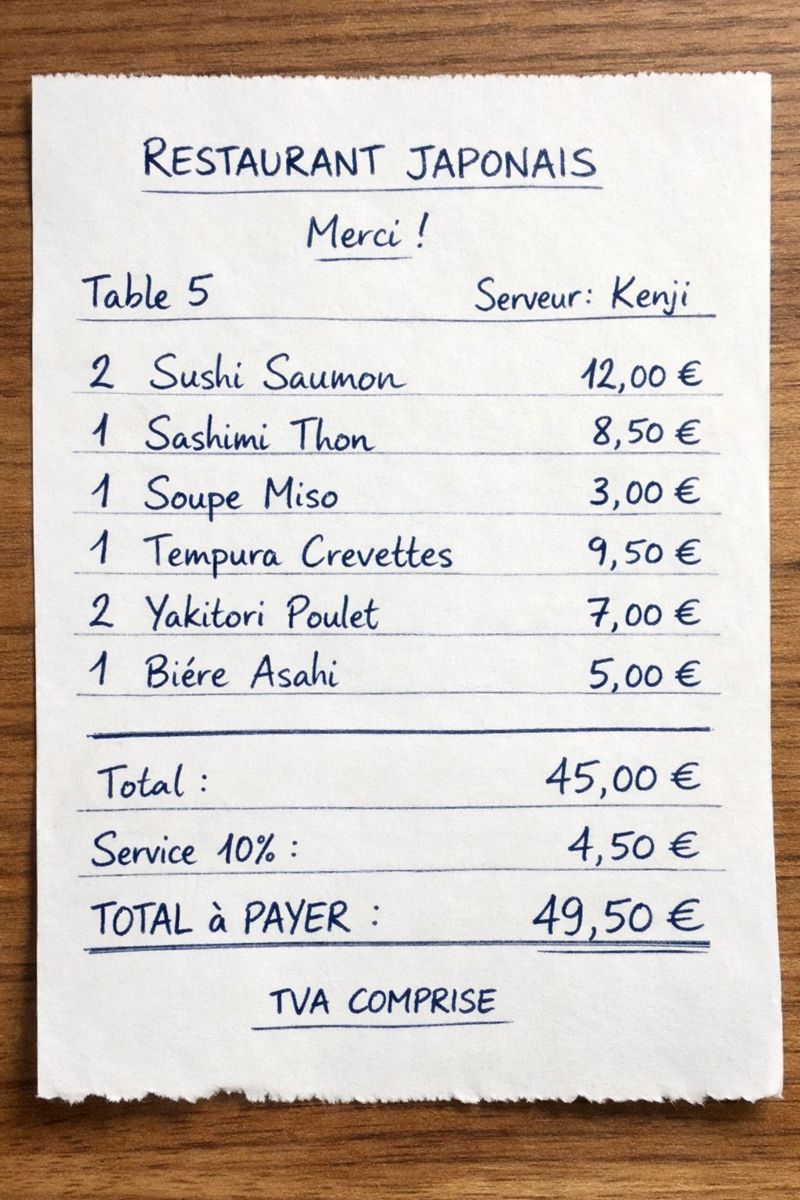
Restaurant receipt (49.50 EUR)
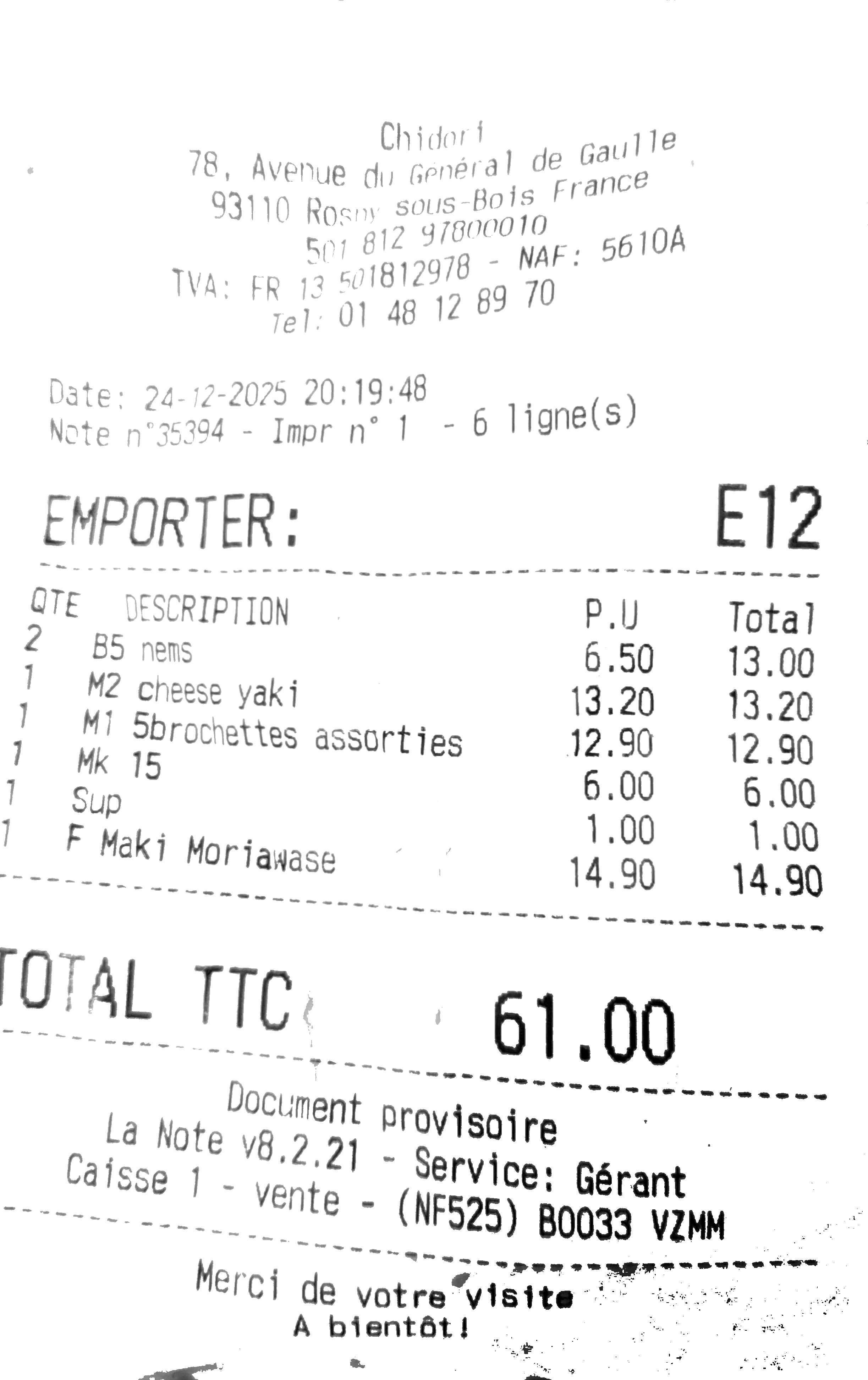
Thermal receipt (61.00 EUR)
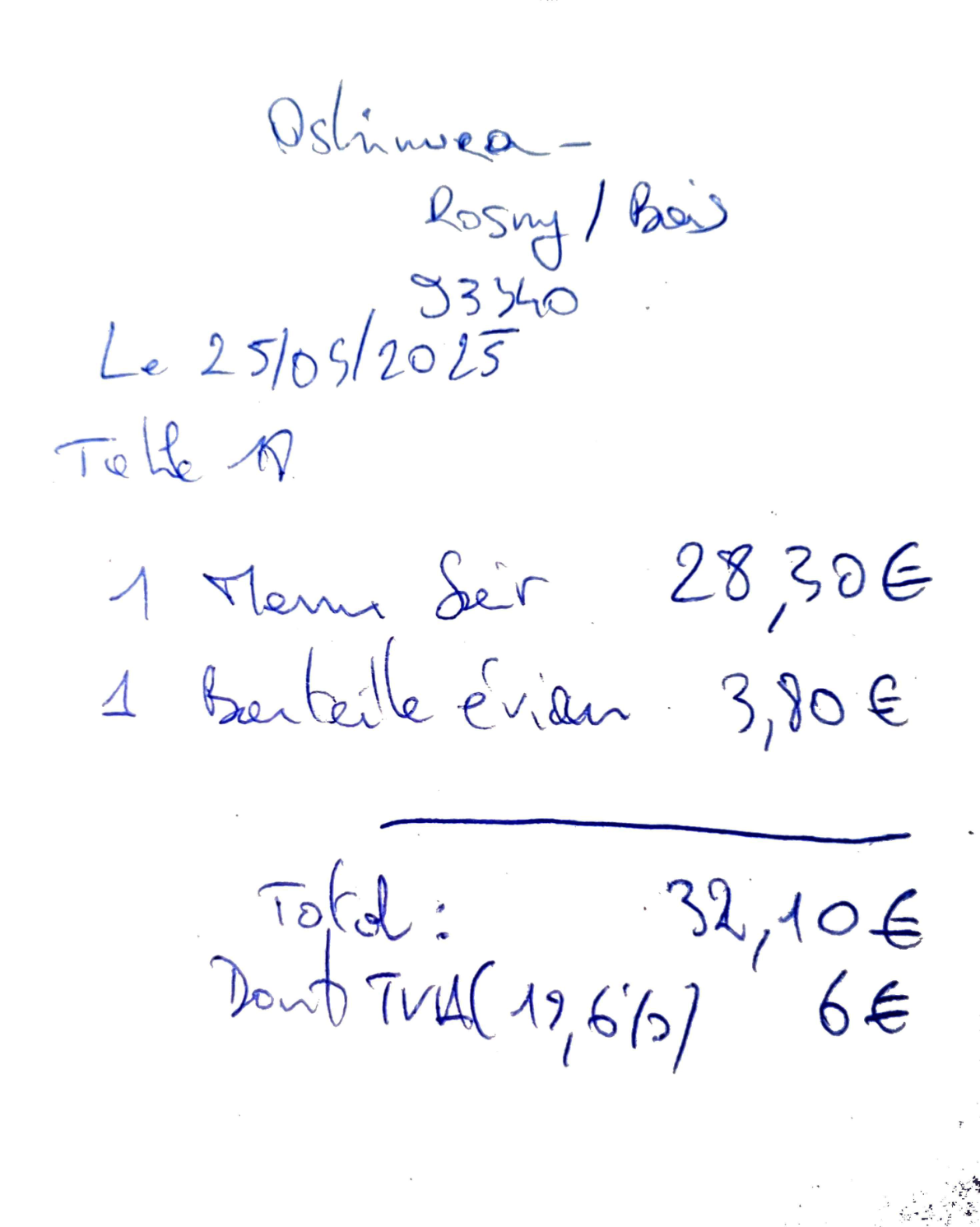
Handwritten invoice (32.10 EUR)
| Model | Score | Time | Amount OK | Vendor OK |
|---|---|---|---|---|
| qwen2.5vl:7b | 0.84 | 78.9s | 3/3 | 1/3 |
| llava:13b | 0.57 | 31.1s | 0/2 | 1/2 |
| minicpm-v | 0.56 | 14.0s | 2/3 | 1/3 |
| bakllava | 0.00 | N/A | 0/0 | 0/0 |
qwen2.5vl:7b is the clear winner with a score of 0.84. It's slower than the others (78.9s total for 3 files) but significantly more accurate on amount extraction.
Evaluation Criteria
- Amount: the most critical field. Must be exact to the euro.
- Vendor: merchant name recognition (tolerant to minor variations).
- Date: YYYY-MM-DD format expected.
- Category: classification among 6 predefined categories.
Detailed Results
Test 1: Japanese restaurant receipt (clear image)
Expected amount: 49.50 EUR
| Model | Extracted amount | Result |
|---|---|---|
| qwen2.5vl:7b | 49.5 | [OK] |
| minicpm-v | 49.5 | [OK] |
| llava:13b | 45.05 | [ERROR] |
Test 2: Real cash register receipt (thermal)
Expected amount: 61.00 EUR - This receipt is more difficult: thermal printing, variable contrast.
| Model | Extracted amount | Result |
|---|---|---|
| qwen2.5vl:7b | 61.0 | [OK] |
| minicpm-v | 61.0 | [OK] |
| llava:13b | 6.0 | [ERROR] |
llava:13b read "6.0" instead of "61.0" - a tens digit reading error. This type of error is critical for an expense report application.
Test 3: Handwritten PDF invoice
Expected amount: 32.10 EUR - The most difficult case: handwriting, PDF converted to image.
| Model | Extracted amount | Result |
|---|---|---|
| qwen2.5vl:7b | 32.1 | [OK] |
| minicpm-v | 3210.0 | [ERROR] |
| llava:13b | N/A (crash) | [ERROR] |
qwen2.5vl:7b is the only model to have correctly extracted all 3 amounts. Its ability to read handwriting is impressive.
Python Implementation
The extraction prompt
The heart of the system is the prompt sent to the LLM. It must be precise to get valid JSON:
EXTRACTION_PROMPT = """Analyze this receipt/invoice image and extract ONLY visible information.

CRITICAL: Only extract information that is CLEARLY VISIBLE on the receipt.
DO NOT invent, guess, or hallucinate any data. If a field is not visible, use null.

Return ONLY valid JSON with this exact structure:
{
    "amount": <total amount as number or null>,
    "vat_amount": <VAT amount as number if visible, or null>,
    "currency": "<currency code EUR/USD/etc or null>",
    "date": "<date in YYYY-MM-DD format or null>",
    "vendor": "<merchant name exactly as written or null>",
    "location": "<address/city ONLY if printed on receipt, otherwise null>",
    "category": "<restaurant|transport|hotel|supplies|fuel|other>",
    "description": "<items purchased, based on receipt content>",
    "confidence": <0.0 to 1.0>
}

IMPORTANT: Return null for any field where information is NOT clearly visible.
Return ONLY the JSON, no explanation."""
LLMExtractor Class
import base64
import io
import json
import re
import httpx
from PIL import Image
import fitz  # PyMuPDF

class LLMExtractor:
    def __init__(self, base_url: str, model: str, timeout: int = 120):
        self.base_url = base_url.rstrip("/")
        self.model = model
        self.timeout = timeout

    def _preprocess_image(self, image_data: bytes, max_size: int = 1500) -> bytes:
        """Resize large images to avoid model crash."""
        img = Image.open(io.BytesIO(image_data))
        if img.mode in ("RGBA", "P"):
            img = img.convert("RGB")

        if img.width > max_size or img.height > max_size:
            ratio = min(max_size / img.width, max_size / img.height)
            new_size = (int(img.width * ratio), int(img.height * ratio))
            img = img.resize(new_size, Image.Resampling.LANCZOS)

        output = io.BytesIO()
        img.save(output, format="PNG", optimize=True)
        return output.getvalue()

    def _pdf_to_image(self, pdf_data: bytes, dpi: int = 200) -> bytes:
        """Convert first page of PDF to PNG."""
        doc = fitz.open(stream=pdf_data, filetype="pdf")
        page = doc[0]
        zoom = dpi / 72
        pixmap = page.get_pixmap(matrix=fitz.Matrix(zoom, zoom))
        return pixmap.tobytes("png")

    def extract_from_bytes(self, file_data: bytes) -> dict:
        # Convert PDF to image if needed
        if file_data[:4] == b"%PDF":
            image_data = self._pdf_to_image(file_data)
        else:
            image_data = file_data

        # Resize large images (avoid model crash)
        image_data = self._preprocess_image(image_data, max_size=1500)

        # Encode and send to Ollama
        image_b64 = base64.b64encode(image_data).decode("utf-8")

        payload = {
            "model": self.model,
            "prompt": EXTRACTION_PROMPT,
            "images": [image_b64],
            "stream": False,
        }

        response = httpx.post(
            f"{self.base_url}/api/generate",
            json=payload,
            timeout=self.timeout
        )
        response.raise_for_status()

        # Parse JSON from LLM response
        llm_response = response.json()["response"]
        result = self._parse_json_response(llm_response)
        return self._validate_result(result)
Important preprocessing: images that are too large (> 1500px) crash qwen2.5vl. Preprocessing with resizing is essential.
extract_receipt Function
Simple entry point for extraction:
# Default instance with config from environment variables
extractor = LLMExtractor(
    base_url=os.getenv("OLLAMA_BASE_URL", "http://192.168.0.240:11434"),
    model=os.getenv("OLLAMA_MODEL", "qwen2.5vl:7b"),
    timeout=int(os.getenv("OLLAMA_TIMEOUT", "120"))
)

def extract_receipt(file_data: bytes) -> dict:
    """
    Extract receipt data from file bytes (JPG, PNG, or PDF).

    Args:
        file_data: Raw file bytes

    Returns:
        dict with: amount, currency, date, vendor, location,
                   category, description, confidence
    """
    return extractor.extract_from_bytes(file_data)
FastAPI Endpoint
@app.post("/extract")
async def extract_from_file(
    file: UploadFile = File(...),
    api_key: str = Depends(verify_api_key),
):
    # Validate file type
    allowed_types = ["image/jpeg", "image/png", "application/pdf"]
    if file.content_type not in allowed_types:
        raise HTTPException(status_code=400, detail="Invalid file type")

    file_data = await file.read()

    result = extract_receipt(file_data)
    return {
        "status": "success",
        "filename": file.filename,
        "extraction": result,
    }
Conclusion and Next Steps
The "Full LLM" approach for document OCR works. The qwen2.5vl:7b model offers 84% accuracy on our benchmark, with perfect amount extraction on all 3 tested files.
POC Key Points
- Simplified architecture: no Tesseract, no regex, no NLP
- qwen2.5vl:7b is the best tested vision model (score 0.84)
- Mandatory preprocessing: resize images > 1500px
- PDF support via image conversion (PyMuPDF)
- Response time: ~25 seconds per document
Next Steps
This POC validates the approach. The project continuation includes:
- Multi-workflow: customized prompts per client/use case
- Validation rules: category limits, conditional rules
- Admin interface: no-code workflow configuration
- Database: extraction history, audit
The complete source code is available on GitLab.