I installed Hermes Agent, Nous Research's agent, on a small server I already had. I talk to it from Telegram: it summarises my mail, watches pages and finds files on my NAS. Here is the full installation, screen by screen, and what I do with it.
What you need
- A Linux machine with Docker. Mine: a Core i3-8100, four cores, less than 4 GB of memory. The image takes about 4.7 GB on disk.
- A model API key. I use Claude Haiku 5.5 through the Anthropic API, with a spending cap to set in the console. For a local model, see the Ollama article.
- A Telegram account.
Installation, step by step
1. The Docker Compose file
The agent is limited to two cores and 1.5 GB of memory, so that it cannot saturate the machine. Adapt cpus and mem_limit to yours, and remove the two NAS lines if you do not have one. In a ~/hermes folder, the docker-compose.yml file:
services:
  hermes:
    image: nousresearch/hermes-agent:v0.23.3
    container_name: hermes
    restart: unless-stopped
    command: gateway run
    volumes:
      - ./data:/opt/data
      - /mnt/nas:/nas:ro,rslave
      - /mnt/nas-rw:/nas_rw:rslave
    environment:
      - TZ=Europe/Paris
      - HERMES_UID=1000
      - HERMES_GID=1000
      - HERMES_DASHBOARD=1
      - HERMES_WRITE_SAFE_ROOT=/opt/data:/nas_rw/agent-share
    env_file:
      - dashboard.env
    ports:
      - "127.0.0.1:9119:9119"
    cpus: 2
    mem_limit: 1536m
    memswap_limit: 1536m
    pids_limit: 512
    security_opt:
      - no-new-privileges:true
2. The two secrets files
There are two, and mixing them up is the classic pitfall: data/.env is read by Hermes, dashboard.env protects the web interface.
mkdir -p ~/hermes/data && cd ~/hermes
touch data/.env dashboard.env && chmod 600 data/.env dashboard.env
# data/.env
ANTHROPIC_API_KEY=...
TELEGRAM_BOT_TOKEN=...
TELEGRAM_ALLOWED_USERS=123456789
# dashboard.env
HERMES_DASHBOARD_BASIC_AUTH_USERNAME=me
HERMES_DASHBOARD_BASIC_AUTH_PASSWORD=...
HERMES_DASHBOARD_BASIC_AUTH_SECRET=... # openssl rand -base64 323. The Telegram bot
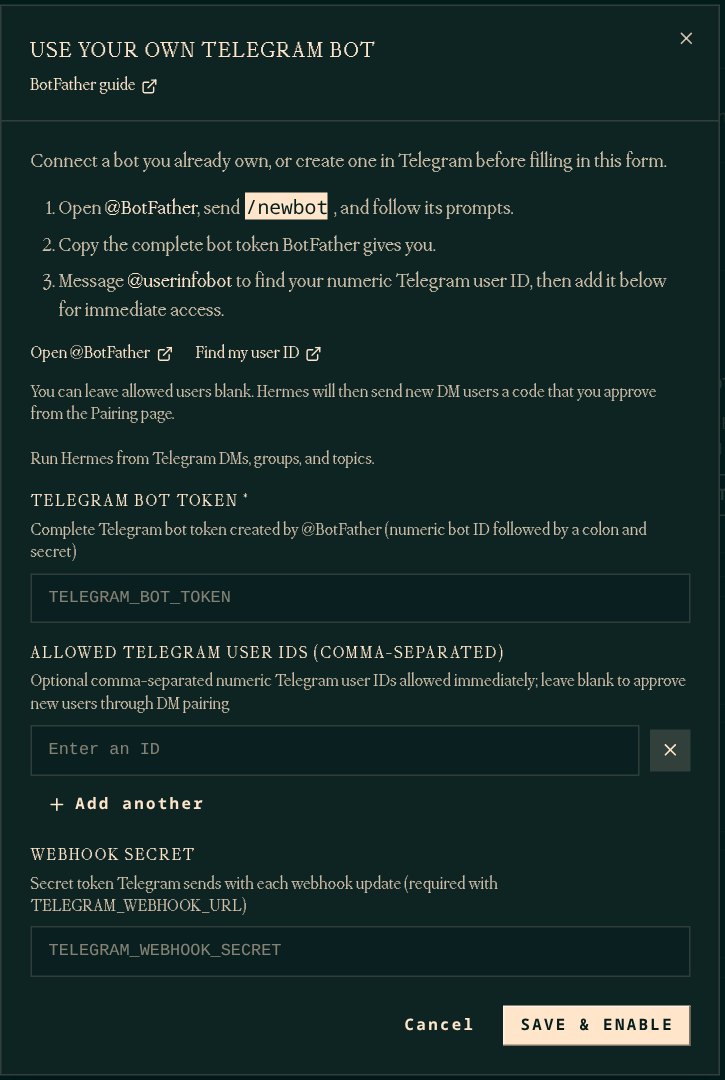
In Telegram, send /newbot to @BotFather, pick a name then a username ending in bot: it gives you the token (TELEGRAM_BOT_TOKEN). Then message @userinfobot to get your number (TELEGRAM_ALLOWED_USERS). That number is what makes the bot answer only you.
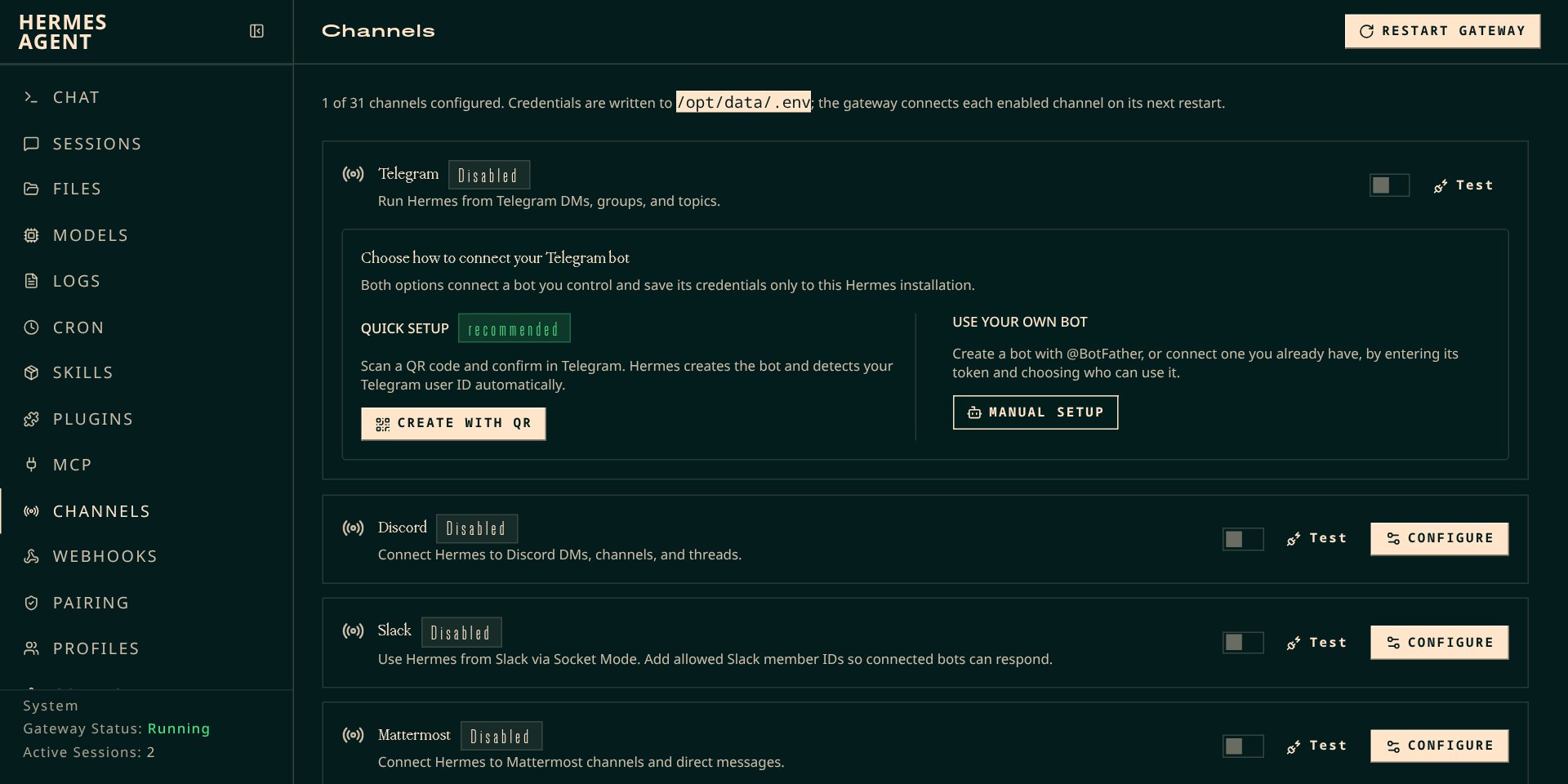
Hermes can also do this from its interface, in the Channels tab, with a QR code or manually:
For more detail: this IONOS guide or the Hermes Agent documentation.
4. Start and check
cd ~/hermes && docker compose up -d
docker logs --tail 50 hermes
Two lines to look for in the logs:
[Telegram] Connected to Telegram (polling mode)
HERMES_DASHBOARD_READY port=9119
5. Choose the model
On first start, Hermes creates data/config.yaml with a default model that may not be yours. Replace these two lines, then restart with docker compose restart:
model:
  default: "claude-haiku-5-5"
  provider: "anthropic"
Say "hello" to the bot. My first two answers arrived in 5.1 then 1.3 seconds.
The dashboard
It only listens on the server's local interface, because it can change the configuration and the keys. From my workstation I reach it through an SSH tunnel, then at http://127.0.0.1:9119:
ssh -N -L 9119:127.0.0.1:9119 my-serverThe tabs I found useful:
- Channels: connected messaging platforms.
- Cron: scheduled tasks, their next run, and a button to run them right away.
- Skills: skills you can switch on and off one by one. 39 are enabled by default on a fresh install: a good place to disable what you do not need.
- Sessions and Logs: what the agent did, and its errors.
- Config and Keys:
config.yamland.env, as forms.
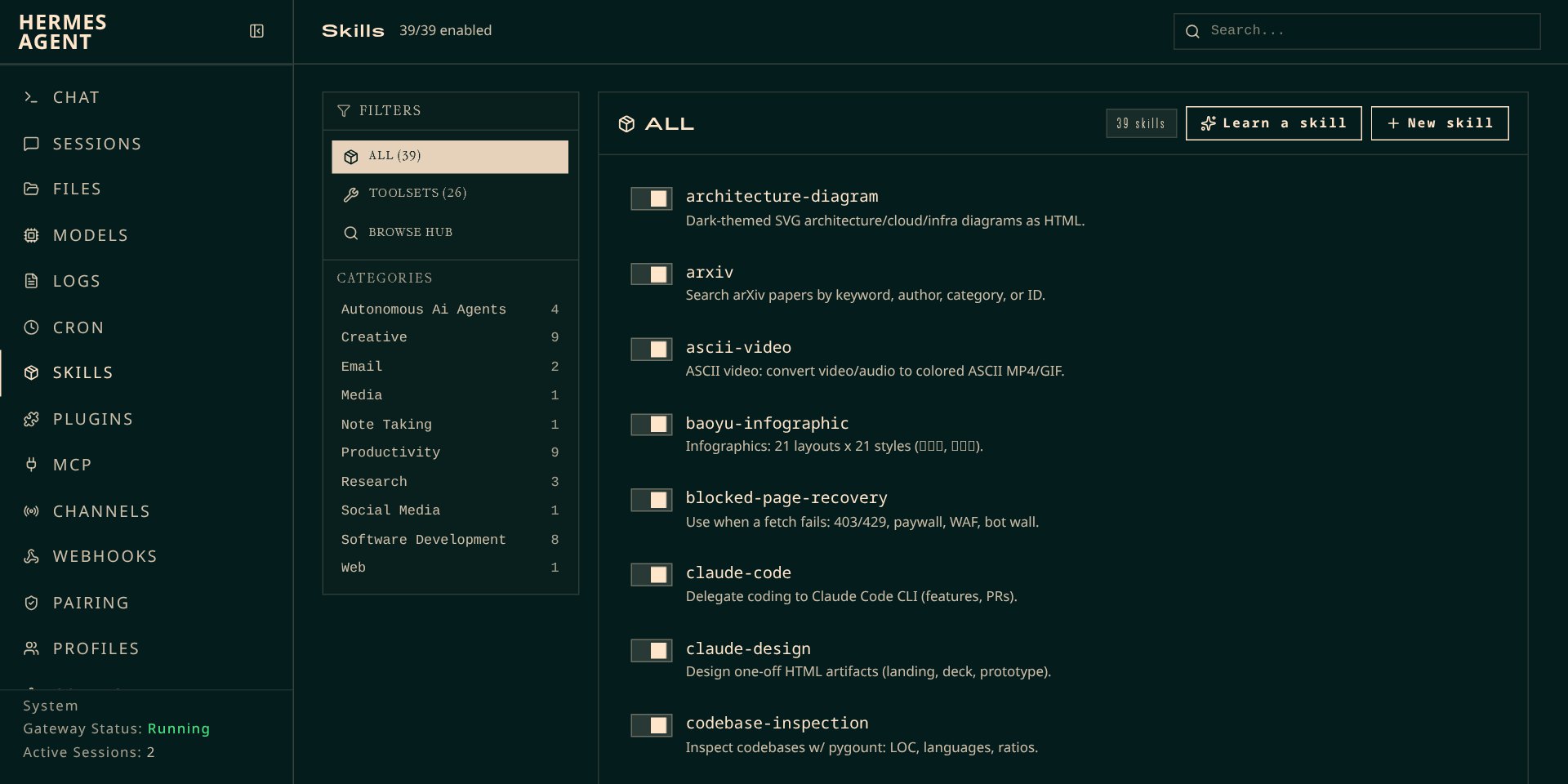
The full list of pages is in the dashboard documentation.
Connecting the NAS
The NAS is mounted on the server, with an account dedicated to the agent. One line per share in /etc/fstab (name and address replaced), with the username and password in a file readable by root only:
//my-nas/documents-share /mnt/nas/documents-share cifs ro,credentials=/root/.smb-agent,vers=3.0,uid=1000,gid=1000,iocharset=utf8,soft,nosuid,nodev,noexec,_netdev,nofail,x-systemd.automount 0 0The container sees it under /nas, and has a single writable folder, /nas_rw/agent-share. Check it right away:
docker exec -u hermes hermes touch /nas/documents-share/x
# touch: cannot touch '/nas/documents-share/x': Read-only file system
docker exec -u hermes hermes touch /nas_rw/agent-share/ok
What I do with it
The 8 am and 4 pm report
The agent goes through my unread mail and the next 24 hours of my calendar, then sends me a summary. I created the task by asking for it in Telegram. The same thing on the command line:
docker exec -u hermes hermes hermes cron create "0 8,16 * * *" \
  "Summarise my unread mail and my calendar for the next 24 hours. Sort into important, to answer, newsletters. Do not send, delete or make up anything." \
  --name "Mail and calendar report" --deliver telegram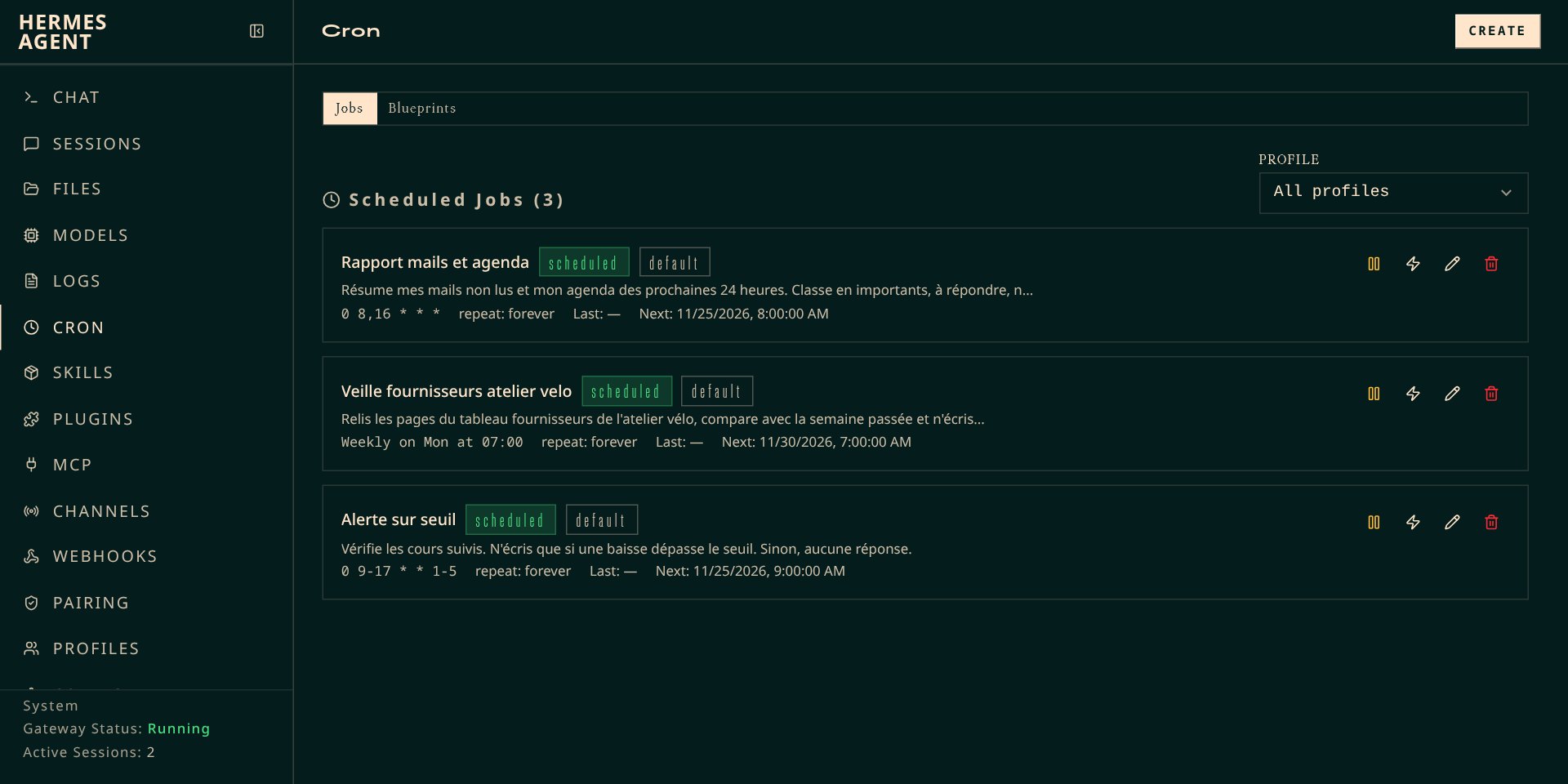
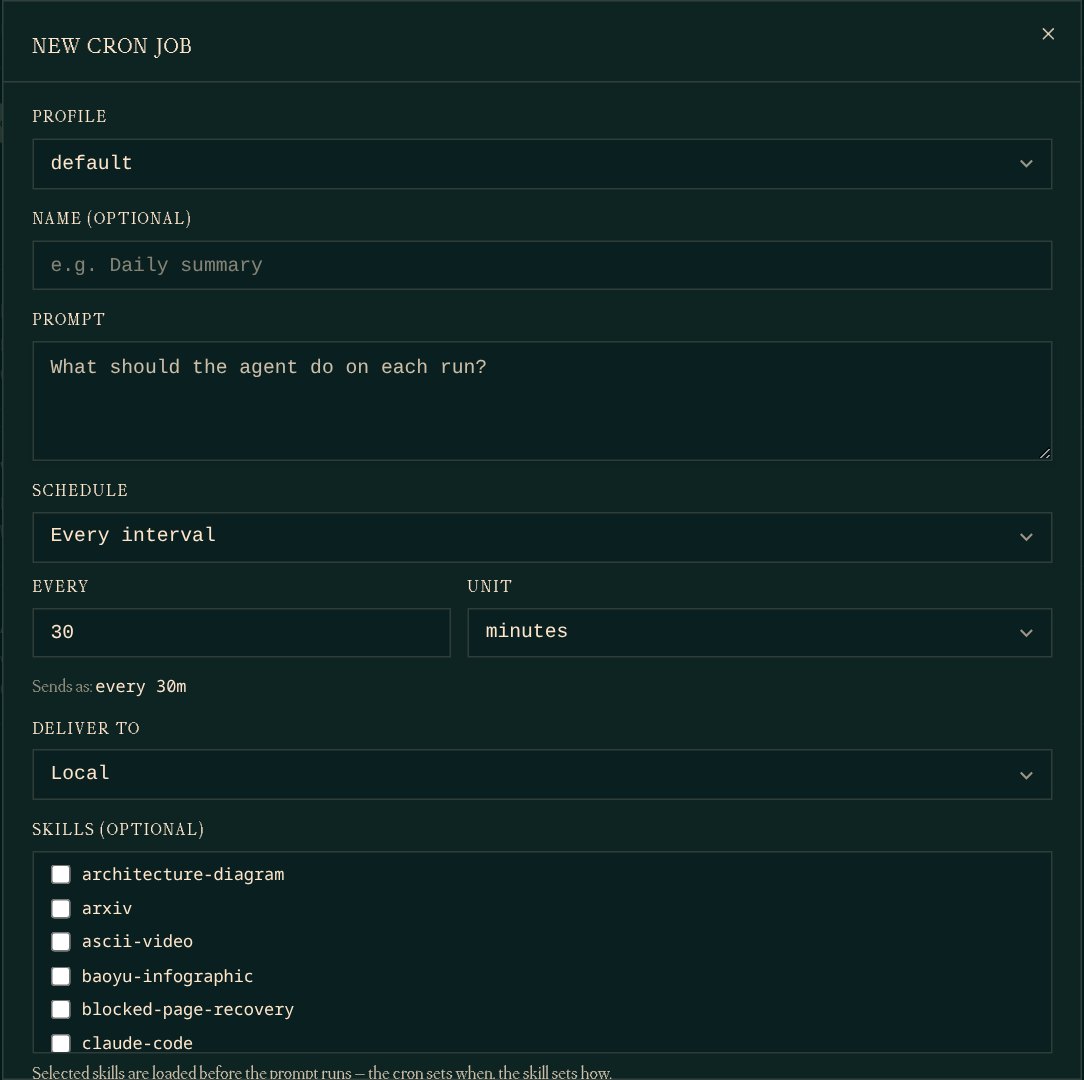
Or from the dashboard's Create button: a name, instructions, a frequency, a destination.
The alert that stays quiet
Every hour from 9 am to 5 pm on weekdays, the agent checks a few stock prices and only writes if a drop exceeds a threshold. The instruction that matters is the last one: "if no threshold is crossed, produce no text". Without it, you get nine useless messages a day.
Finding files by voice
I send a voice message, it searches the NAS and sends the file back in the conversation: a 2021 photo lost in a folder tree, a supplier spreadsheet.
Typical exchange, reconstructed (not a screenshot)
I had not installed transcription. On my first voice message, the agent found it had no tool for it, installed faster-whisper in its own space, wrote a script and noted the procedure in its memory. Ten minutes to get it right; since then, a simple voice request is answered in about ten seconds. Transcription happens on the server, only the text goes to the model.
Coming next: the restaurant receipt, from table to NAS
I have not set it up yet, but the building blocks are there: photo of the bill in Telegram, reading, approval, filing on the NAS.
Typical exchange, reconstructed (not a screenshot)
The instructions to give:
When I send you a photo of a restaurant bill, extract the date, the restaurant, the total including tax and the VAT by rate. If a value is unreadable, write "to check" and do not guess it. Show me the result and wait for my approval before saving anything. Then store the photo in the month's folder and add the row to the spreadsheet. Never overwrite an existing file.
Approval before saving is essential: a model can confidently read an 8 as a 3. The photo goes through the model's API, and keeping it does not spare you from checking record-keeping rules with your accountant. I tested receipt reading in the article on LLM-based OCR.
Example: supplier watch for a bike workshop
Fictional example, data included. A workshop buys tyres and drivetrains from a few suppliers and wants to know when a lead time or a price changes. First, a request in the conversation:
Find European suppliers of tyres and drivetrains for bike workshops that sell to professionals. For each one: website, country, range, minimum order, announced lead time, link to the page where you read it. If a piece of information is not published, write "not published". Put the result in a spreadsheet, in agent-share.
| Supplier | Country | Range | Minimum | Announced lead time | Source |
|---|---|---|---|---|---|
| Supplier A | Belgium | Drivetrains | EUR 150 | 3 days | shipping page |
| Supplier B | France | Tyres, tubes | not published | 48 h | trade page |
| Supplier C | Germany | Tyres, drivetrains | EUR 200 | 5 days | terms of sale |
Then the Monday 7 am task, which only writes if there is something new:
docker exec -u hermes hermes hermes cron create "0 7 * * 1" \
  "Reread the pages in the bike workshop supplier spreadsheet, compare with last week and only write if a lead time, an item or a public price has changed. Give the link for each change. Do not contact anyone." \
  --name "Bike workshop supplier watch" --deliver telegram
What it consumes
A one-off reading on my machine on 24 November:
NAME     CPU     MEMORY
hermes   7.94%   1.392GiB / 1.5GiB
A fresh instance starts at around 450 MB. Mine is close to its limit, and while I was getting transcription to work, the kernel killed one of the agent's processes twice. With a transcription model, plan for more than 1.5 GB if you can.
What to let it touch
The bot only obeys me, but it reads mail, pages and files written by others. A sentence slipped into an email can try to pass itself off as an order. Writing "do not send anything" helps, but blocks nothing: permissions do. What I recommend:
- Telegram: a single allowed ID, never the "everyone" option.
- Files: only the folders it needs, read-only, and one single writable folder.
- Google: the
gmail.readonlyandcalendar.readonlyscopes. A summary does not need to send or delete. - Docker: no access to the socket.
- Dashboard: never exposed to the Internet.
Read-only access protects from changes, not from leaks: an agent that browses the web still has a way out. Do not give it access to anything you cannot afford to see leave. In a company, start with a narrow scope, without customer data or payroll.
Pitfalls
- The time zone. Without
TZ, the container runs in UTC and the 7 am task leaves at 8 am Paris time in winter. - Secrets in the wrong
.env. Hermes reads the one in the data directory, not the one in the Compose directory. - Writes refused on the NAS. Mounting it is not enough:
HERMES_WRITE_SAFE_ROOTalso limits the folders its tools are willing to write to. - The Docker image version number. In
docker-compose.yml, writehermes-agent:v0.23.3, with the "v". Without it, Docker cannot find the image and the installation stops there. - Two containers on the same data. Never do it: sessions get corrupted.
What comes next
Two days do not make a track record. I do not yet know what it costs per month, or what I will still be using in six weeks. That will be a second article, with figures.
A repetitive task you would like to hand to an assistant like this? Get in touch or find me on LinkedIn.